Yukon Gold Casino on Mobile: iOS, Android and the App Question
Affiliate disclosure: we may earn a commission if you join through our links. This never changes our rating or what we report.
The question everyone arrives with has a one-word answer — no, there is no Yukon Gold Casino app to download. You will not find one on the App Store or Google Play, and any link claiming to offer one should be treated with suspicion. What you get instead is a browser-based instant-play casino that loads straight into Safari or Chrome and works the same on iPhone and Android. I tested it on both, and for a Microgaming jackpot casino that approach is genuinely fine — sometimes better than a native app. Below is exactly how to play, what works on a small screen, and how the cashier behaves on mobile.
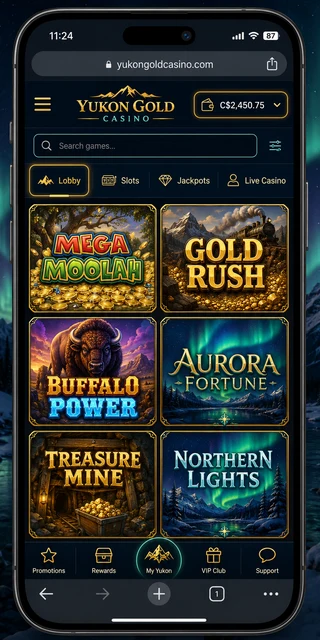
Is there a Yukon Gold Casino app?
No — there is no dedicated native app for Yukon Gold Casino. I searched both app stores and checked the live site, and the casino does not ship an iOS or Android application you install. This is normal for the Casino Rewards group and for Microgaming brands generally. A legacy Microgaming download client did historically exist for desktop Windows, where you installed a program to play, but that is a relic and it never applied to phones. For modern mobile play, the route is the browser, full stop.
That is not the cop-out it sounds like. A browser-based instant-play casino means there is nothing to install, nothing taking up storage, and nothing to update — the lobby you load is always the current version. If you ever see a "Yukon Gold app" advertised in an app store or a download link in an email, be careful: it is not official. The real product lives at the website, and you reach it the same way on every device.
How to play on iPhone (iOS)
On an iPhone or iPad the flow takes under a minute:
- Open Safari (it works in Chrome for iOS too, but Safari is the cleanest).
- Go to the Yukon Gold Casino site and let the instant-play lobby load.
- Log in if you already have an account, or sign up if you don't — the registration form is built for touch.
- Tap the Share icon, then choose Add to Home Screen. iOS drops a Yukon Gold icon onto your home screen that opens the casino in one tap, giving you the app-like feel without an actual app.
From there you deposit, play and cash out entirely in the browser. If you are new, our walkthrough on creating an account on your phone covers each field so KYC goes smoothly later, and returning players can jump straight to logging in on mobile.
How to play on Android
Android is the same idea, with Chrome as the default browser:
- Open Chrome on your phone.
- Navigate to the Yukon Gold site and wait for the lobby to load — usually a couple of seconds on Wi-Fi.
- Log in or create your account.
- Open Chrome's menu (the three dots) and choose Add to Home screen. Android places a launcher icon that opens the casino directly, behaving like an installed app.
No APK, no sideloading, no Play Store search. Sideloaded "casino apps" from outside the Play Store are a common malware vector, so the browser route is also the safer one. Everything — games, jackpots, banking — runs in that Chrome session.
What works on mobile
Effectively everything you get on desktop comes across. Because the site is responsive instant-play rather than a stripped-down app, the full experience follows you to the small screen.
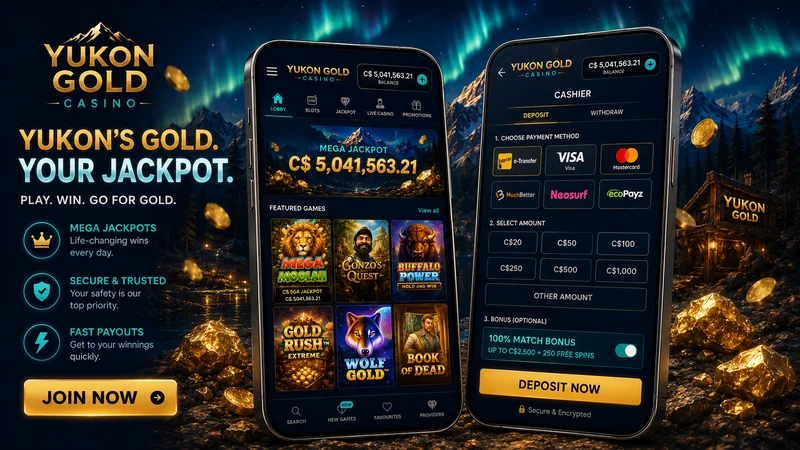
- The full lobby — over a thousand Microgaming titles, including classics like Immortal Romance and Thunderstruck II, render and play in the browser.
- The jackpots — the Mega Moolah network and Mega Money Wheel are all touch-ready; you are chasing the same progressive on your phone as on a PC.
- Evolution live tables — live roulette, blackjack and baccarat stream straight to the phone. These are the one place I'd strongly recommend turning your phone sideways.
- The cashier — full deposit and withdrawal flows, with Interac e-Transfer front and centre for Canadians.
- Support chat — 24/7 live chat opens in the same window, so you can reach an agent without leaving the game.
For a closer look at which titles feel best on a touchscreen, see our notes on mobile-friendly games.
Performance and data
Instant-play has real advantages on a phone. There is no install step and no app updates to babysit, so you are never stuck waiting on a download before you can play. On a normal Wi-Fi or LTE connection the lobby loads in a few seconds and slots spin without noticeable lag. Data use is reasonable for slots — comparable to browsing image-heavy pages — though live dealer tables stream video and will use meaningfully more, so they are best on Wi-Fi or an unmetered plan.
One practical tip from testing: portrait is fine for the lobby and slots, but rotate to landscape for live tables. The Evolution studios are designed wide, and the betting layout, chip stacks and dealer feed are far easier to use sideways. Adding the site to your home screen also helps performance perception — it opens full-screen without browser chrome, which makes the whole thing feel closer to a real app.
Mobile banking & withdrawals
The cashier does not change when you switch to a phone. You get the same Canadian-dollar methods — Interac e-Transfer as the headline, plus Visa, Mastercard, iDebit and Instadebit, and e-wallets like ecoPayz, MuchBetter, Skrill and Neteller. The minimum deposit is still C$10, and the same-method rule still applies: you generally withdraw back to whatever you deposited with. Our full breakdown of mobile deposits covers the limits and timings in detail.
I ran the whole cashout from a phone to be sure nothing breaks on a small screen. Funding came in first — C$20 by Interac e-Transfer, tapped straight from my banking app — then I claimed the welcome offer and put a few low-volatility slots through their paces. Requesting the C$120 Interac withdrawal in the mobile cashier was a couple of taps; the slow part was the one-time KYC, which cleared in about 36 hours, with the payout arriving roughly 24 hours after that — two to three days for a first cashout, done entirely in the browser. Mobile changes none of the limits: the same roughly C$4,000 weekly ceiling on standard winnings that outpace deposits, with progressive jackpot wins exempt from that cap.
This is a representative benchmark reconstruction built on typical Casino Rewards processing times and Interac e-Transfer behaviour, not a screenshot of an audited transaction. Your own timings will vary with verification and method.
Frequently asked questions
Is there a Yukon Gold app to download?
No. There is no dedicated native Yukon Gold Casino app on the App Store or Google Play. The casino runs as a browser-based instant-play site, so you simply open it in Safari or Chrome and play with no download. A legacy Microgaming download client historically existed for desktop, but mobile play is browser-based.
Can I play on iPhone?
Yes. Open Safari on your iPhone, go to the Yukon Gold site, log in or sign up, and the full lobby loads instantly. You can tap the share icon and choose Add to Home Screen to get an app-like icon that opens the casino in one tap, without installing anything.
Do all games work on mobile?
The vast majority do. Microgaming slots, the Mega Moolah jackpots and Evolution live dealer tables are all built to run in a mobile browser. A handful of older titles play best in landscape, and live tables in particular are easier to read when you rotate your phone sideways.
Can I deposit and withdraw on mobile?
Yes. The cashier is the same on mobile as on desktop. You can deposit and withdraw in Canadian dollars using Interac e-Transfer, Visa, Mastercard, iDebit and the supported e-wallets, with the same C$10 minimum deposit and the same same-method withdrawal rule.
For the complete picture of the offer, the jackpots, banking and the fine print, head back to the Yukon Gold review hub.
19+ (18+ in Alberta, Manitoba and Quebec). Gambling can be addictive. If it stops being fun, call ConnexOntario at 1-866-531-2600. Please play within your limits.